Wrench Solutions - Project Management Information System
  • Solutions
        • Type of Companies
          • Owners / Developers
          • Engineering Consultants
          • EPC Contractors
          • Equipment Manufacturers
          • General Contractors
          • PMC
          • Capital Project Investors
        • Industries
          • Oil &Gas
          • Transportation
          • Infrastructure & Construction
          • Chemical & Process
          • Renewable Energy
          • Water & Wastewater
          • Metals & Mining
          • Datacenter & Fitouts
          • AEC
          • Power Generation & Transmission
          • Marine
        • Roles
          • Project Directors
          • Project Managers
          • Planning Engineers
          • Engineering Managers
          • Document Controllers
          • Checkers and Reviewers
          • Client Project Manager
          • Designers & Draftsmen
          • Vendors
  • Products
        • SmartProject Suite
          • SmartProject DMS
          • SmartProject EDMS
          • SmartProject EPC MS
          • SmartProject PMIS
          • SmartProject Digital PMO
        • AI Agents
          • AI Control Tower
          • Contracts AI Agent
          • Bid Review AI Agent
          • AI Technical Reviewer
          • Asset Intelligence AI
          • AI Analyser
        • SmartProject Features
          • Planning & Project Controls (5)
          • Engineering & Design Management (15)
          • Procurement & Contract Management (9)
          • Construction & Execution (8)
          • Monitoring, Control & Collaboration (3)
          • Commercial & Measurement (2)
          • Commissioning, Handover & Closure (4)
          • Integrations & Ecosystem (4)
          • Mobility & Field Enablement (1)
          • All Features (51)
  • Why Wrench
        • Why Wrench
          • SmartProject EDMS vs other EDMS
          • SmartProject EDMS vs Email + Excel
          • SmartProject EDMS vs ERP + DMS
          • SmartProject PMIS vs Traditional PM tools
          • SmartProject PMIS+ ACC
          • SmartProject PMIS+ Primavera
          • SmartProject Compliance to ISO 19650
          • SmartProject Compliance to ISO 21500
          • SmartProject Compliance to PMI
        • Customers
          • Customers List
          • Projects
          • Testimonials
          • Case Studies
  • Resources
        • Resource Centre
        • Blog
        • Podcasts
        • Wrench Talk
        • Webinar
        • White Paper
        • Product Related
          • Technology
          • FAQ
  • Company
        • About Us
        • Wrench Academy
        • Partners
        • Careers
        • News & Events
        • Wrench Foundation
        • Contact Us
        • Certifications
  • Book a Demo
SupportBook a Demo

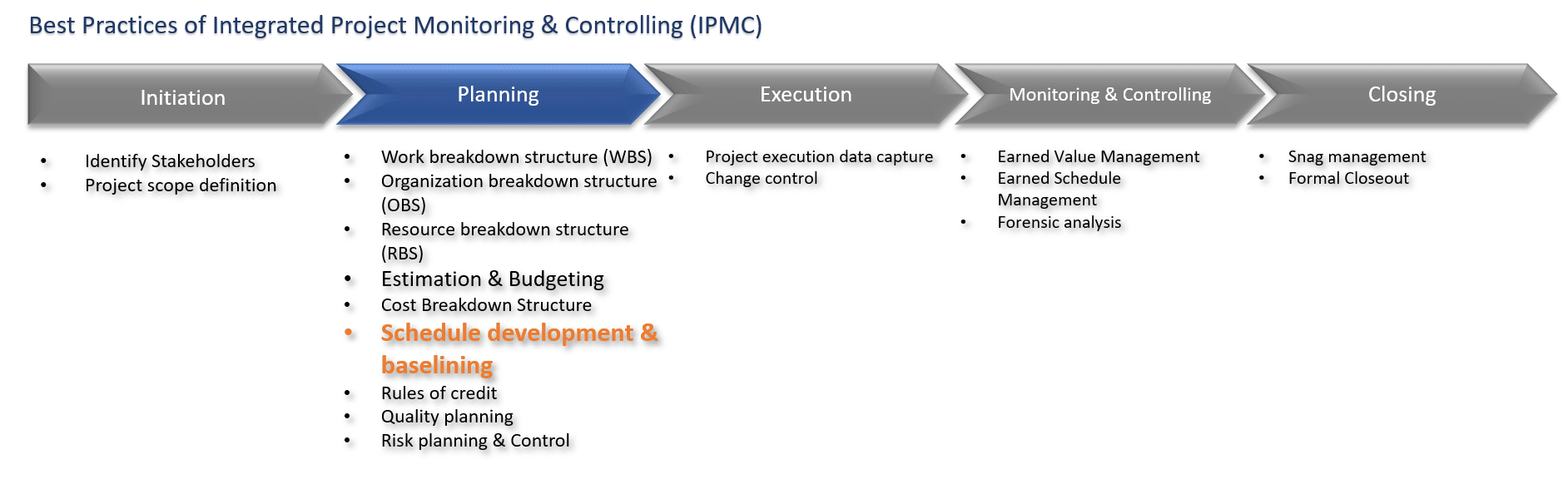
Schedule Development & Baselining
Home Schedule Development & Baselining

Schedule Development & Baselining

Learning Objective 

Upon successful completion of this module, you will ;

  • Master the steps involved in scheduling 
  • Understand the significance of critical path 
  • You will also learn about float, buffer, lag, lead, fast tracking, crashing and their impact on project duration 
Effort required – 30 minutes

 Lesson Introduction 

Upon successful completion of this module, participants will gain good understanding of the steps involved in developing and optimizing project schedules.  
Level : Basic  
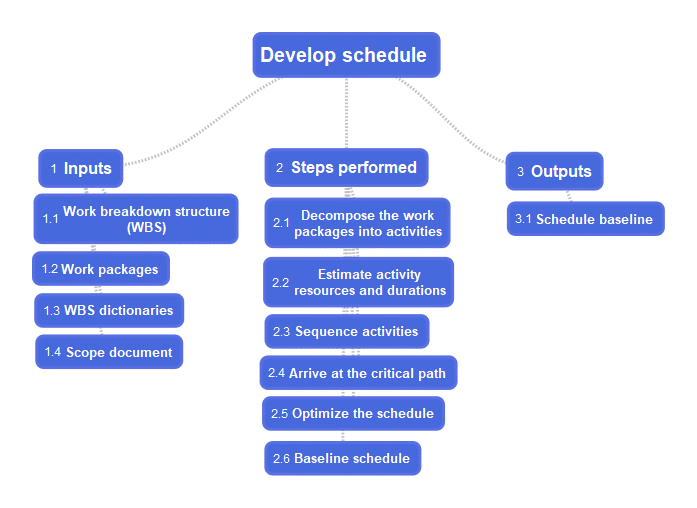
Diagram#1 Develop schedule mind map  

  1. Inputs 
  • Work breakdown structure (WBS)  
  • Work packages  
  • WBS dictionaries  
  • Scope document  
  1. Steps performed 
  • Decompose the work packages into activities  

  • Estimate activity resources and durations  
  • Sequence activities based on their dependencies  
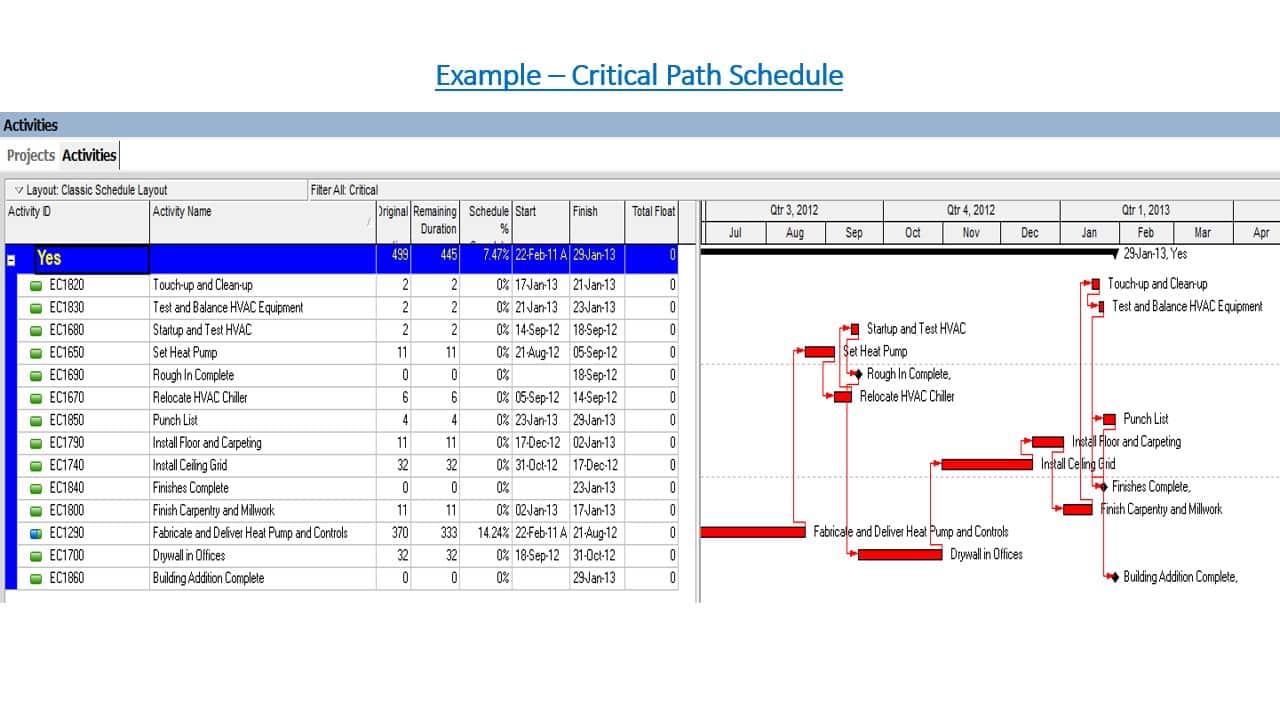
  • Arrive at the critical path  
  • Optimize the schedule by adjusting leads, lags, crashing, fast tracking, resource leveling etc  
  • Baseline the schedule  
  1. Decompose the work packages into activities  

Diagram#2 Scope to Activity decomposition sequence  

Every project starts with the high level scope, which gets elaborated into detailed scope. The detailed scope is decomposed into work breakdown structure (WBS). At the lowest level of the WBS are the work packages. The work packages are decomposed further into activities.  

  1. Estimate activity resources and durations 
  • Analogous estimation – Arriving at the estimate by comparing with a past similar activity  
  • Parametric estimation – Based on indexes (cost per square feet, time per square feet)  
  1. Sequence activities based on their dependencies 

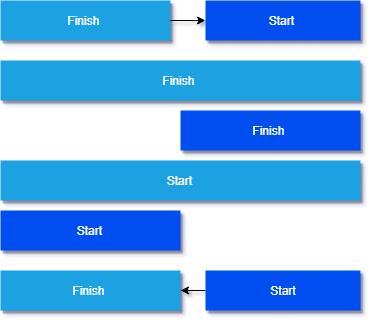
Diagram#3 FS, FF, SS, SF – The four types of activity dependencies  

  1. Arrive at the critical path

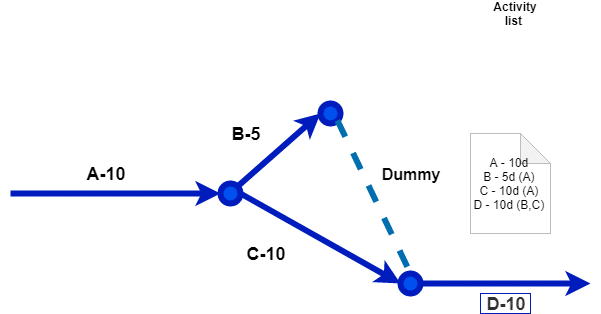
Diagram#4 Activity on arrow diagram  

The longest path in the network is the critical path. In the diagram above, the duration of the path A,B,D is 25, and the duration of the path A,C,D is 30, hence A,C,D is the critical path. The activities on the critical path should not slip. If they slip, the project will slip. If any of the activities on the path A,C,D slips by 1 day, the project duration will become 31. Even if there is a delay of 5 days on path A,B,D , the project will not slip.  

  1. Optimize the schedule by adjusting the leads and lags, buffer, float, fast tracking, crashing,resourceleveling 

Lag – waiting time between two tasks 

Diagram#5 Lag  

Lead – Parallelism between two tasks  
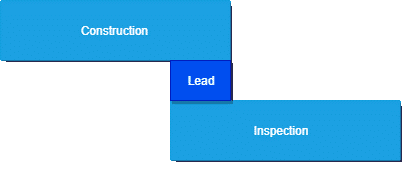
Diagram#6 Lead  

Buffer – In projects, one encounter unforeseen contingencies, and we create buffers to deal with them. For example, in the diagram below, if everything goes as per plan, construction can be completed in 3 days time. For dealing with contingencies a buffer of 2 days is added, and the total duration of the task becomes 5.  
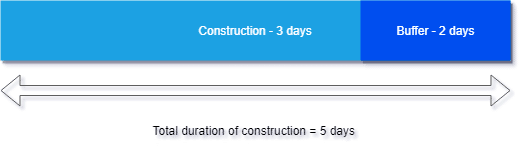
Diagram#7 Buffer 

Float – The amount of time an activity can be delayed without affecting the early start date of the subsequent activity. Activities on the critical path will have zero float. An understanding of the amount of float available helps the planner to optimize resource deployment. For example, if a task with very low float is slipping, one can always release resources from a task with lot of float and deploy them in the slipping task. 
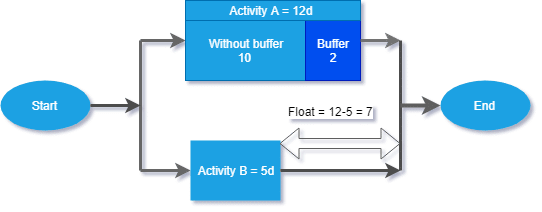
Diagram#8 Float  

Resource leveling – When we start allocating resources to tasks, some of the resources can be over loaded, where as some under loaded. The process of optimizing the resource loading against tasks by ensuring that all resources are almost equally loaded is known as resource leveling.  

Fast tracking – Trying to do things in parallel, which were originally scheduled sequentially  

Crashing – Trying to reduce the duration of a task, by deploying more resources into it.  

After the creation of the schedule, we apply all the above mentioned concepts to fit the schedule within the acceptable duration and cost. Once the schedule optimization is completed, the schedule is approved and baselined.  

  1. Baseline the schedule– Version control of the schedule 

Outputs  

  1. Schedule baseline  

Summary

 
The longest path in the project network is the critical path. In other words, it is the shortest possible time in which a project can be completed. Activities on the critical path have zero float. Sometimes, projects may have multiple critical paths. In that case, project management becomes complex. Effective project managers not only track the critical paths, but also will track paths with minimal floats to prevent project slippage. To recover from slippages or to speed up project execution, one may fast track or/and crash activities on the critical path. 
 

Exercise

 
Take a work package from any of your projects. Decompose it into activities. Estimate the activity durations. Using either the Activity on Node (AON) or Activity on Arrow (AOA), arrive at the critical path. 
 

Request a Training Course Today!

GET TRAINED

Company

  • About us
  • News
  • Contact us
  • Careers

Products

  • EDMS/CDE
  • Bim Management
  • Schedule & Progress Management
  • Cost Management
  • Procurement Management
  • Construction Management
  • Resource Management
  • Quality Management
  • Safety Management
  • Risk Management
  • Snagging and Project Closure
  • Integrations
  • Construction Monitoring & Control
  • Contract Management
  • Project Portfolio Monitoring

By Companies

  • Owner
  • PMC
  • Consultant
  • EPC Contractor
  • General Contractor
  • Equipment Suppliers

Resources

  • Resource Centre
  • Blog
  • Case Studies
  • Projects

Downloads

Acceptable Use Policy | Privacy Policy

© 2026 Wrench Solutions. All rights reserved.